
Every Yoto card
finally in order
See everything your family owns, official and Make Your Own cards alike. Group them into bundles that mirror how the physical cards are stored, and push those bundles straight into the Yoto app.
- 1. Tap the button. Yoto's own site opens and asks you to authorize the app. We never see your password.
- 2. Your card library loads here automatically.
- 3. Organize it your way, then sync bundles back into the Yoto app. Disconnect anytime.
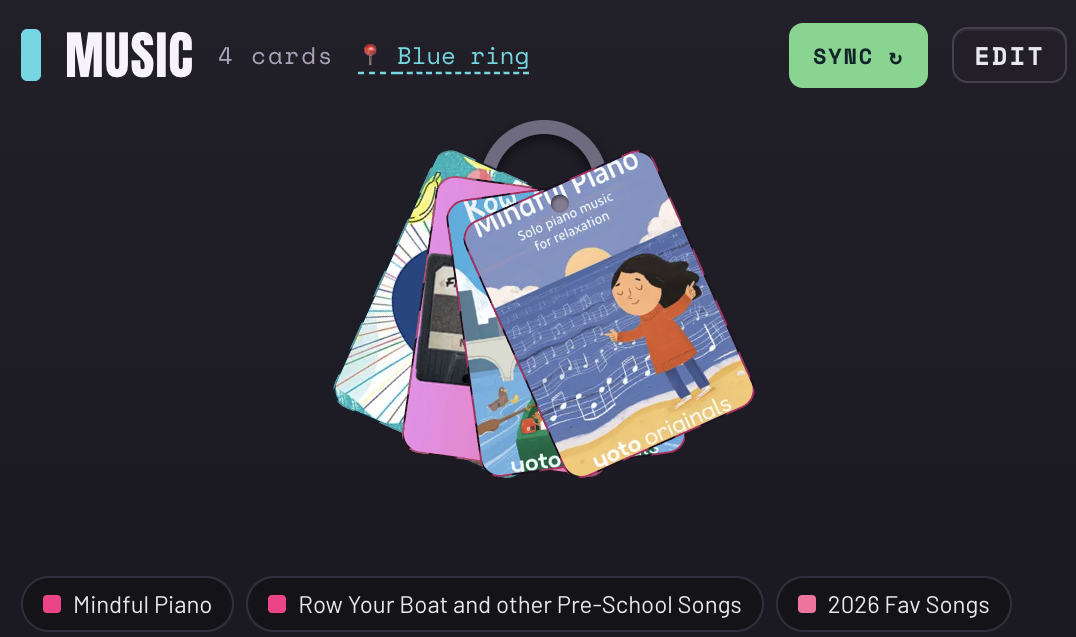
A real bundle in the app. Sign in to build yours.
Get started
Start from a real strategy
Not sure how to sort? Pick a preset the way other Yoto families do it - by kid, bedtime vs. daytime, by series, or a weekly rotation ring. One tap proposes the bundles and you just pick which cards go where.
Teach it a rule once
Tell a bundle something like “category is music” and every future card that matches will file itself the moment it's first tapped.
Six ways to use this
Work top to bottom, or jump in anywhere.
Good to know - a card appears in your library once it's been played on a player at least once. A new card stays invisible until its first tap. Your library resyncs automatically when you visit (and daily in the background).
Bundles that mirror your system
Pick the view that matches how the cards physically live. Same bundle, three ways.
Sound familiar?
This helps with that
The card is missing. Again.
Cards wander. Mark one missing with a tap and it wears a quiet amber tag everywhere it appears. When it turns up behind the couch, one tap marks it found.
Which ones don't we have?
Series are hard to track. The Series view lines up what you own by number and flags the holes, like owning #1 and #3 with no #2. Handy right before a birthday.
The shelf and the app drift apart.
You sort rings and label binders in real life, and the app never knows, so the two systems slowly break. Here every bundle records where it physically lives, and one tap syncs it into the Yoto app so they stay matched.

Hi, I'm Neha 👋
When I gifted a Yoto to my toddler last Christmas, I had no idea how many questions I would have. How do other people organize theirs? How do you make a MYO card without accidentally deleting the one with the train song? Are rings better than albums, and if I pick wrong, will I have to live with it forever?
It was fun but a little intimidating. BUT I'm the kind of person who loves organizing things and naming my systems (for fun!!), and honestly, I like a challenge. Once I figured it all out, I wanted to group the cards my way and set a rule or two for where new ones should go. What I truly needed was a way to map all the physical cards on our shelf onto their digital life in the Yoto app. That bridge didn't exist, so I built it. It's for anyone with a card pile to sort through for the little listener in their life.
Send me suggestions, improvements, or just a hello at nsrivast.ns@gmail.com. If you found this useful, feel free to buy me a coffee ☕
Uses your Yoto account's official API access. We only read your card library and manage groups you ask us to. Not affiliated with Yoto.